
How to Tell If a CR2032 Battery Is Still Good
By PlainBattery Team
Key takeaways
- Measure both open-circuit and loaded voltage.
- Compare the result with the device cutoff, not only a datasheet endpoint.
- Inspect dirty or weak contacts before blaming the cell.
The usual question is simple: is this CR2032 still good, or do I need a new one?
A normally discharged CR2032 may show no obvious visual change. Diagnosis therefore needs a voltage measurement and an observation of the device under load.
Full specs and equivalents: CR2032 chart.
Treat voltage bands as diagnostic clues
| Open-circuit reading | Interpretation and next action |
|---|---|
| 3.2–3.4 V | Common fresh-cell range; still inspect condition and verify under the intended load |
| Around 3.0 V | Remaining service depends on pulse sag and the device’s minimum supply voltage |
| Around 2.8 V | Limited margin for many 3 V electronics; measure loaded voltage before deciding |
| Below 2.5 V | Heavily discharged for many consumer uses, though this is not a universal device cutoff |
The Energizer CR2032 datasheet rates capacity down to 2.0 V under its specified laboratory load. That value is a datasheet test endpoint, not proof that a key fob, CMOS circuit, scale, or tracker will operate at 2.0 V. The device’s brownout threshold and loaded voltage determine the usable endpoint.
Use a digital multimeter on a DC-voltage range that includes 3 V. Red probe goes on the (+) writing face and black on the (−) can.
A cell can still read ~3.0 V with no load and then collapse under a key-fob pulse. If the meter says “good” but the remote only works when you press the cover, clean the contacts or confirm you do not have a CR2025 in a CR2032 holder.
Device symptoms (no meter)
- Key fob: range drops, you must stand next to the door, or only one button works.
- PC CMOS / BIOS: clock resets after every shutdown; settings will not stick.
- Scale: flicker, jumping weight, or instant power-off.
- Tracker: missed updates or a “low battery” notice around the one-year mark.
Those symptoms show up more often than a pack that is simply past its printed date.
Date codes vs “2033 batteries”
A stamp that looks like 2033 is often a best-by year, not a CR2033 size. If the can also says CR2032, you still have a 20 × 3.2 mm cell. See the CR2032 FAQ.
Do not “test” by charging it
A standard CR2032 is not rechargeable. Putting it in a LIR2032 charger is a heat and rupture risk. If you meant a rechargeable 2032-size cell, that part is LIR2032, not CR2032.
After you replace it
- Match the printed code — CR2025 vs CR2032 vs CR2016.
- (+) face toward the marked clip.
- For car remotes, re-sync only if the vehicle manual says so.
Related: key fob guide · CMOS / motherboard guide.
Record a load test you can repeat
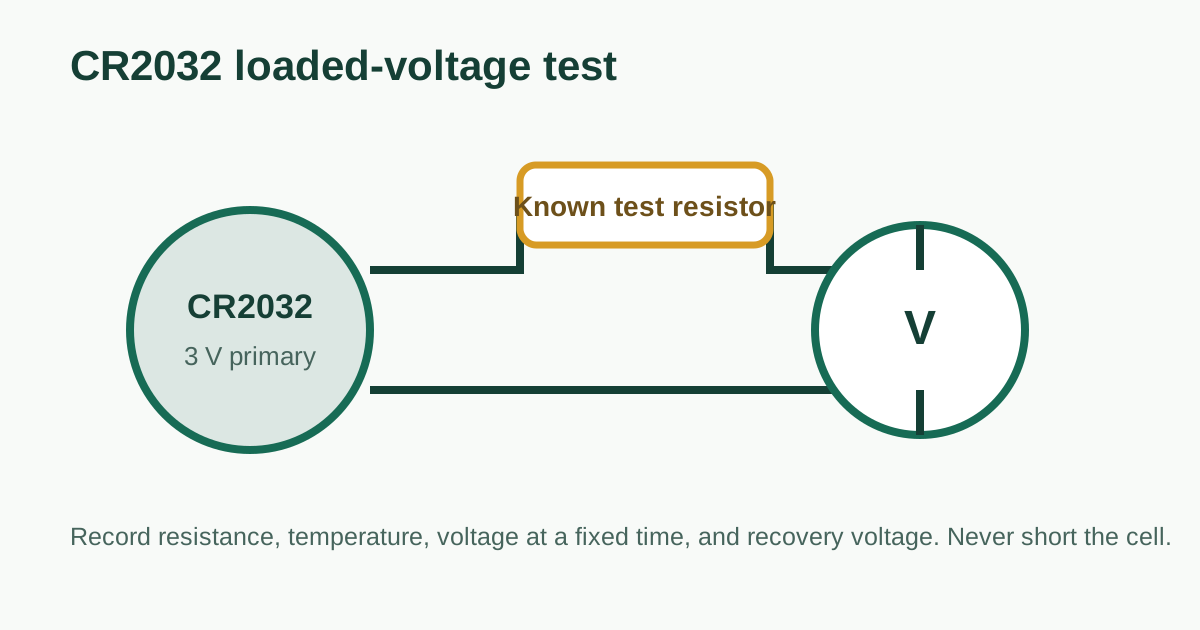
An open-circuit reading is a quick screen. For a useful comparison, attach a known resistor, measure voltage after a fixed interval, and document resistance, temperature, meter, cell model, and cutoff rule. Never short the terminals with a probe or ammeter.
The Energizer datasheet uses a 15 kΩ continuous load for its capacity rating and shows a separate 400 Ω pulse test lasting two seconds, repeated 12 times per day. Those are reference conditions, not universal pass/fail tests for every device. A car fob has its own pulse and minimum voltage; a CMOS clock has a much lighter drain.
Download the CR2032 load-test record template and replace its example row with measured values. Recording the load and timing prevents an unloaded voltage from being presented as a complete health test.
If two cells are being compared, let them reach the same room temperature and use the same fixture and contact pressure. Measure at rest, during the load, and shortly after removing it. Large sag followed by quick recovery points to internal resistance and explains why a cell may pass an unloaded meter check but fail inside a remote.
Separate battery faults from contact faults
Clean dry contacts according to the device manual, inspect the spring for lost tension, and confirm the holder was designed for 3.2 mm thickness. If pressing the cover restores operation, investigate mechanical contact before discarding a cell. If a known-good CR2032 also fails, stop replacing batteries and diagnose the device current or electronics.
Related charts
Review record and primary sources
Reviewed by PlainBattery Technical Review Desk on 2026-09-11. Checked: instructions and calculations, battery specifications used in examples, safety limits and linked primary references.
- Energizer CR2032 Product Datasheet — Energizer Brands, CR2032EU0118 (2018). Fresh voltage context, rated capacity test, pulse test and safety warning.
- Panasonic Lithium Technical Handbook — Panasonic Energy, 2020 handbook (2020). Dimensions, nominal voltage, capacity and operating-temperature range.
Revision record: source citations and field-level review scope added September 11, 2026. See our sources and methodology and corrections policy.